
Yes, most vacation rental hosts should use dynamic pricing. Well-calibrated setups tend to lift revenue 20 to 40 percent over static pricing, but the tool only earns that number if you configure it correctly first. Before you turn anything on, do three things:
-
Set a realistic seasonal base rate for each property
-
Set a per-property price floor above your break-even cost
-
Confirm your calendar syncs cleanly across every channel
Expect the algorithm to handle 60 to 80 percent of the available gain on its own, with a 30 to 90 day calibration window before the numbers are trustworthy enough to judge.
Key Takeaways
Dynamic pricing works when hosts set accurate floors, ceilings, and seasonal base rates first, then let the algorithm optimize within those boundaries.
| Point | Details |
|---|---|
| Set guardrails before automating | Calculate your break-even floor and set a seasonal base rate before enabling any tool. |
| Expect a 90-day calibration | Trustworthy revenue comparisons typically emerge by day 61 to 90, not sooner. |
| Match the tool to your scale | Simple autopilot suits 1 to 2 listings; configurable platforms suit 5+ with active review. |
| Watch for floor-chasing | Rates that consistently hit your floor signal a configuration problem, not a weak market. |
| List directly for more control | Gulf Shores Alabama’s marketplace lets owners set rates with local Gulf Coast market visibility and direct guest contact. |
Table of Contents
What Is Dynamic Pricing for Vacation Rentals?
Dynamic pricing is software that adjusts your nightly rate automatically based on real-time market signals, rather than a fixed calendar of seasonal rates you set once and forget. Static or seasonal pricing means you pick a summer rate and a winter rate and leave them alone for months. Dynamic pricing recalculates daily, reading demand, competitor rates, and booking pace to nudge your price up or down within limits you control.
The tool is only half the system. The rules you feed it, your floors, ceilings, and event overrides, decide whether the output makes money or quietly erodes it.
Pro Tip: If you own one unique luxury property with no real comparables nearby, or you have a very small number of listings, static pricing with periodic manual updates can outperform automation until you have enough data to calibrate against.
How Do Dynamic Pricing Tools Calculate Nightly Rates?
Every major dynamic pricing engine reads four core signal families: demand and search activity, comparable supply nearby, booking pace relative to historical norms, and known events like festivals or holidays. Layered on top are secondary factors: lead time, day of week, and length-of-stay patterns.
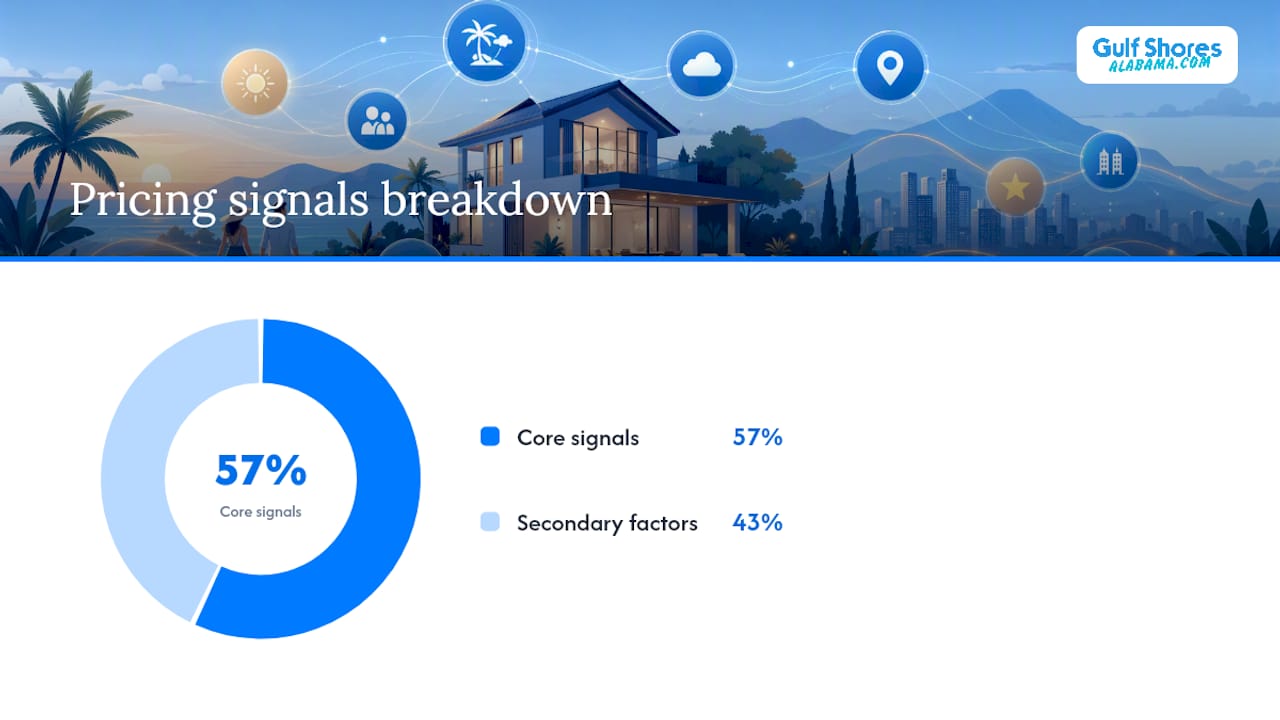
The math itself works like this: base rate × demand factor = recommended rate, then clipped to your floor and ceiling.
Say your seasonal base rate for a Gulf-front condo is $250 a night.
-
A hot demand week (concert in town, low remaining inventory) might apply a 1.4x multiplier, pushing the recommendation to $350
-
A slow shoulder-season week might apply a 0.8x factor, dropping it to $200, unless your floor sits higher
Industry-leading tools reprice daily using this exact structure, which is why your floor and ceiling matter more than the algorithm itself.
Who Actually Benefits From Dynamic Pricing?
Portfolio size and market depth decide whether automation pays off. A host with one listing in a thin market and a manager running 30 units in a competitive coastal destination need very different approaches.
| Situation | Recommended approach |
|---|---|
| 1 to 4 listings, fewer than 20 comparables | Static or hybrid, manual quarterly updates |
| 5+ listings, 20+ comparables, 90+ days of booking history | Full dynamic pricing |
| Mixed portfolio, some unique/luxury units | Hybrid: dynamic for standard units, manual for outliers |
Below roughly five properties or fewer than 20 comps in your market, a well-calibrated manual approach often beats automation simply because the algorithm has too little data to work with. Once you clear those thresholds, and your calendar sync is clean, dynamic pricing has the raw material it needs to work well.
-
Confirm clean calendar sync across Airbnb, Vrbo, and your PMS before switching anything on
-
Wait until you have 90 days of booking history before fully trusting the calibration
Setting Up Guardrails Before You Automate
Automation without guardrails is how hosts end up chasing the market down instead of up. Work through this checklist before your first automated rate goes live:
-
Calculate your break-even floor: fixed costs (mortgage, insurance, utilities) plus variable costs (cleaning, platform fees) divided by expected occupancy nights
-
Set seasonal base rates manually, anchored to your comp-set median, refreshed quarterly
-
Set a floor and ceiling per property. A common rule of thumb is a floor around 60 to 70 percent of the base rate, adjusted by season
-
Verify your comp set actually reflects similar properties, not just nearby ones
-
Set minimum-stay rules around weekends and known high-demand windows
Worked example: if your fixed and variable costs run $1,800 a month and you expect 20 booked nights, your break-even floor is $90 a night. Set your actual floor above that to protect margin.
Pro Tip: Lock event dates 90 to 180 days out so the algorithm can’t discount a festival weekend before you’ve had a chance to review it manually. Keep the aggressiveness setting conservative for your first 30 to 90 days.
Comparing the Major Dynamic Pricing Tools
The right tool depends on how much control you want versus how much you’d rather hand off. A single-listing host and a 40-property management company are shopping for different things entirely.
| Tool | Best for | Pricing model | Setup / customization | PMS & channel integrations | Control / granularity | Data depth |
|---|---|---|---|---|---|---|
| Gulf Shores Alabama marketplace | Owners wanting direct bookings and local exposure | Listing-based | Simple, hands-on with owner | Direct owner/manager contact | Owner-managed | Local Gulf Coast market focus |
| PriceLabs | Data-driven hosts needing granular rules | Per-listing subscription | High customization | Broad PMS/channel support | Very high granularity | Extensive market data |
| Beyond Pricing | Managers wanting simple onboarding | Percentage of revenue | Simple, fast setup | Strong PMS integrations | Moderate | Solid market coverage |
| Wheelhouse | Hosts wanting automation plus scenario testing | Per-listing subscription | Moderate to high | Good integrations | High, with templates | Moderate to strong |
| Airbnb Smart Pricing | Single-listing hosts, beginners | Free, built-in | Minimal | Airbnb only | Low, min/max only | Airbnb-only data |
| Hostaway Dynamic Pricing | Managers already on Hostaway | Bundled with PMS | Moderate | Native Hostaway integration | Moderate | Moderate |
| Lodgify Dynamic Pricing | Hosts using Lodgify for direct bookings | Bundled with platform | Moderate | Lodgify website/channel manager | Moderate | Moderate |
| AirDNA Adapt | Hosts wanting deep market analytics | Subscription add-on | Moderate | Limited native PMS ties | Moderate | Very extensive |
| Guesty PriceOptimizer | Larger managers on Guesty | Bundled with PMS | Moderate to high | Native Guesty integration | High for portfolios | Strong |
| Hostfully Dynamic Pricing | Hostfully users wanting guided setup | Third-party integration guidance | Guided | Hostfully integrations | Moderate | Moderate |
| Sunny AI (by SummerOS) | Large portfolios wanting AI plus oversight | Subscription | Moderate to high | Portfolio-level integrations | High, AI-driven | Strong |
If you’re testing a new tool, check these during onboarding:
-
Does it support a per-property floor and ceiling, not just a portfolio-wide default?
-
Can you lock specific dates for events without disabling automation entirely?
-
Does it sync same-day with your PMS, or is there a lag that risks double bookings?
Choose a simpler autopilot tool like Airbnb Smart Pricing if you run one or two listings and want zero extra cost. Choose a highly configurable platform like PriceLabs or Wheelhouse if you or a revenue manager plan to actively tune rules every week.
Your First 90 Days: A Practical Workflow
Days 1 through 30 are about setup: base rates, floors, ceilings, and comp sets go in, and you watch for obviously wrong outputs. Days 31 through 60 are calibration, where you tighten floors that triggered too often and adjust aggressiveness. By day 61 through 90, revenue comparisons become trustworthy enough to act on.
Once you’re past that window, settle into a steady cadence:
-
Weekly: check booking pace against the same week last year, review gap nights, flag any upcoming local events the tool might miss
-
Weekly: adjust minimum-stay rules around newly booked weekends
-
Monthly: track ADR, occupancy, RevPAR, lead-time distribution, and where you sit in your comp set
-
Pull your comp set report and confirm it still matches your property type
-
Compare this month’s RevPAR to the same month last year, not last month
-
Adjust your floor if you notice repeated bookings landing right at the floor line
Common Pricing Failures and How to Fix Them
Most dynamic pricing complaints trace back to configuration, not the algorithm itself.
-
Floor set too low: rates collapse in slow weeks. Fix by recalculating your break-even cost and raising the floor.
-
Wrong comp set: rates trend far from what similar properties actually charge. Fix by manually reviewing and rebuilding your comp list twice a year.
-
Calendar sync gaps: double bookings or stale availability. Fix by auditing your PMS-to-channel sync monthly.
-
Missed local events: underpriced peak weekends. Fix by locking event dates in advance.
If ADR drops sharply over two consecutive weeks with no seasonal explanation, check your floor setting first. That’s the fastest place automation quietly does damage.
What the Numbers Actually Say About ROI
A 2025 study of 541 short-term rentals running a PriceLabs-powered setup found gross revenue per unit up 36.3% and nights booked up 37.3%, alongside a slight average daily rate dip and 20% fewer cancellations. That combination, more bookings at a slightly lower average rate, is a common pattern: the algorithm often trades a bit of ADR for meaningfully higher occupancy.
Algorithm-only pricing tends to capture roughly 60 to 80 percent of the total available gain. The remaining 20 to 40 percent comes from human review: catching events the tool misses, adjusting for local knowledge, and correcting floors that were set too conservatively or too aggressively.
Automation also saves hosts time. Estimates put the savings around 0.6 hours per listing per month compared to fully manual rate management, though active oversight still eats up a similar amount of time reviewing pacing and making overrides. Dynamic pricing reduces manual grind. It doesn’t eliminate the need for a human paying attention.
Gathering Market Data for a Customized Pricing Strategy
Good pricing starts with knowing your actual comp set, not a guessed one. Pull rates and availability from properties genuinely similar to yours: same bedroom count, similar amenities (pool, beach access, pet-friendliness), and comparable location within your market. A three-bedroom Gulf-front condo shouldn’t be benchmarked against a one-bedroom cottage three miles inland, even if both show up in a broad search.

Start with your own listing history if you have at least 90 days of bookings. Look at which weeks sold out fast, which lingered, and what rate they sold at. That’s your most reliable signal, more reliable than any market-wide average, because it reflects how your specific property performs.
Layer in third-party market data next. Tools like AirDNA Adapt pull broader market occupancy and rate trends, useful for spotting shifts before they show up in your own calendar. Cross-reference with a local events calendar, something like a regional festival guide, so you catch demand spikes your booking history alone wouldn’t predict.
Refresh your comp set at least twice a year. Markets shift as new listings enter and older ones drop off, and a comp set built two years ago may no longer reflect who you’re actually competing against. Rebuild your seasonal base rates from that median each quarter rather than letting the algorithm optimize around a stale anchor indefinitely.
Integrating Pricing Tools With Your PMS and Listing Platforms
Start by auditing what you already use. If you run a property management system like Hostaway, Guesty, or Lodgify, check whether it has native pricing built in before adding a third-party layer, since a native integration usually syncs faster and reduces the risk of conflicting rates across channels.
If you need a standalone tool, connect it to your PMS first, not directly to Airbnb or Vrbo. Routing pricing through your PMS keeps a single source of truth and avoids the sync lag that happens when multiple tools each try to push rates independently.
Follow this sequence:
-
Connect the pricing tool’s API to your PMS account and confirm it pulls your existing listings correctly
-
Import your historical booking data if the tool supports it, since this shortens the calibration window
-
Set your floors, ceilings, and seasonal base rates inside the pricing tool before enabling automatic sync
-
Push a test rate change on one property and confirm it appears correctly across every connected channel within a few hours
-
Enable automation gradually, one property or a small group first, rather than your entire portfolio at once
Watch for double-booking risk during the first week. A sync delay between your pricing tool, PMS, and listing channels can create a window where a property looks available on one platform after it’s booked on another. Most platforms show a sync status or last-updated timestamp. Check it daily until you’ve confirmed the connection is reliable.
If you manage listings directly through a marketplace like Gulf Shores Alabama’s rental listings, keep your base rates and calendar updated there as your anchor point, since direct-booking guests often check that listing first.
Monitoring and Adjusting After Launch
Set your monitoring cadence before you need it. Waiting until a bad week to start checking numbers means you’re already behind.
Weekly, compare your current booking pace to the same week last year rather than last week. Vacation rental demand is seasonal, so week-over-week comparisons often mislead you into overreacting to normal seasonal dips. Flag any gap nights sitting unbooked within a 14-day window and check whether the price needs a manual nudge.
Monthly, pull four numbers: average daily rate, occupancy, RevPAR, and where your rates rank in your comp set. RevPAR matters more than ADR alone, because a high rate with low occupancy can still lose to a moderate rate that fills every night. If RevPAR is climbing while occupancy shrinks, your floor might be creeping too high.
Quarterly, rebuild your comp set and your seasonal base rates. Markets change: new listings enter, older competitors adjust their own strategy, and a comp set from six months ago may no longer represent your actual competition.
Watch for one specific warning sign: rates that consistently land at your floor or ceiling. That’s the algorithm telling you the boundary is wrong, not that the market is being difficult. If a property’s price hits its floor most weeks in a slow season, either your floor is too high for that season, or your base rate needs a seasonal adjustment you haven’t made yet.
Legal and Ethical Considerations Hosts Should Know
Dynamic pricing itself is legal and standard practice across the vacation rental industry, comparable to how airlines and hotels have priced rooms for decades. The considerations that matter for hosts are transparency and fairness, not the practice of variable pricing itself.
Guests should see the final nightly rate clearly before booking, with cleaning fees, taxes, and any service charges disclosed rather than added as a surprise at checkout. Listing platforms like Airbnb and Vrbo generally require this breakdown already, but if you list directly through your own site or a marketplace, the same clarity applies. A guest who feels misled by hidden fees is far more likely to leave a negative review than one who simply paid a higher rate for a high-demand weekend.
Anti-discrimination law is the other piece to understand. Your pricing algorithm should adjust rates based on market signals, demand, dates, length of stay, never based on a guest’s protected characteristics. Fair housing rules that apply to long-term rentals increasingly extend scrutiny to short-term rental platforms as well, so pricing tools should never factor in anything about who is booking, only when and for how long. Stick to the four core signal families (demand, supply, pacing, events) and you stay well within that line.
A publisher’s take on getting this right
Dynamic pricing rewards hosts who configure it carefully, not those who flip it on and walk away. Gulf Shores Alabama gives owners a direct line to local guests and the listing tools to set smart, well-calibrated rates from day one.
Choosing a Path That Fits Your Portfolio
There is no single right pricing tool, only the right one for your portfolio size, your market depth, and how much time you want to spend on rate review each week. What matters more than the brand you pick is whether you set real floors, real seasonal bases, and actually review the output during your first 90 days.

If you’re weighing PriceLabs, Beyond Pricing, or one of the PMS-bundled options against simply managing your own rates, there’s another route worth considering: listing directly through Gulf Shores Alabama’s marketplace. Instead of running your pricing strategy in isolation, you get direct exposure to travelers actively searching Gulf Shores, Orange Beach, and Fort Morgan, plus a direct line of communication with guests rather than routing every question through a third-party algorithm’s guesswork. You still set your own base rates and floors, but you’re doing it with local market visibility built into where your listing lives, not just a generic nationwide dataset.
Whether you’re setting up a beachfront condo or a pet-friendly cottage, start by browsing comparable Gulf Shores listings to see how similar properties are priced, then list your own property to start building the booking history your pricing strategy will eventually depend on.
Sources
-
Dynamic Pricing for Vacation Rentals — The Complete Guide | ROAM
-
Benefits of Dynamic Pricing For Vacation Rental Hosts
Recommended
About the Author
Joe Godar of the GulfShoresAlabama.com Editorial Team creates destination guides, vacation-planning resources, and local travel content focused on Gulf Shores, Orange Beach, and Fort Morgan, Alabama.
Our team researches Alabama Gulf Coast beaches, vacation rental trends, family activities, local attractions, restaurants, events, and direct-booking best practices. Every guide is created to help travelers plan more confidently, discover the best of the Alabama Gulf Coast, and avoid unnecessary third-party guest service fees.
GulfShoresAlabama.com is part of the Emerald Coast by Owner marketing family, connecting travelers directly with verified vacation rental hosts throughout the Gulf Coast since 2016.
This article was reviewed for accuracy and updated using local destination research and current Alabama Gulf Coast vacation rental market insights.